Ten AI Tools Worth Adding to a Video Workflow (Beyond the Obvious One)
Ask someone who is new to this which AI tool they use and the answer is almost always the same one. Which is understandable – it is the name that broke through – but it produces a strange situation where people are using a single general-purpose assistant for jobs that other tools do far better.
A general chat assistant is a good pocket knife. It is not a workshop. If you are making videos regularly, the difference between one tool and a small set of specialised ones is measured in hours a week.
Here are ten I have found genuinely useful in a faceless video workflow, what each is actually for, and the caveats nobody puts in the listicles.
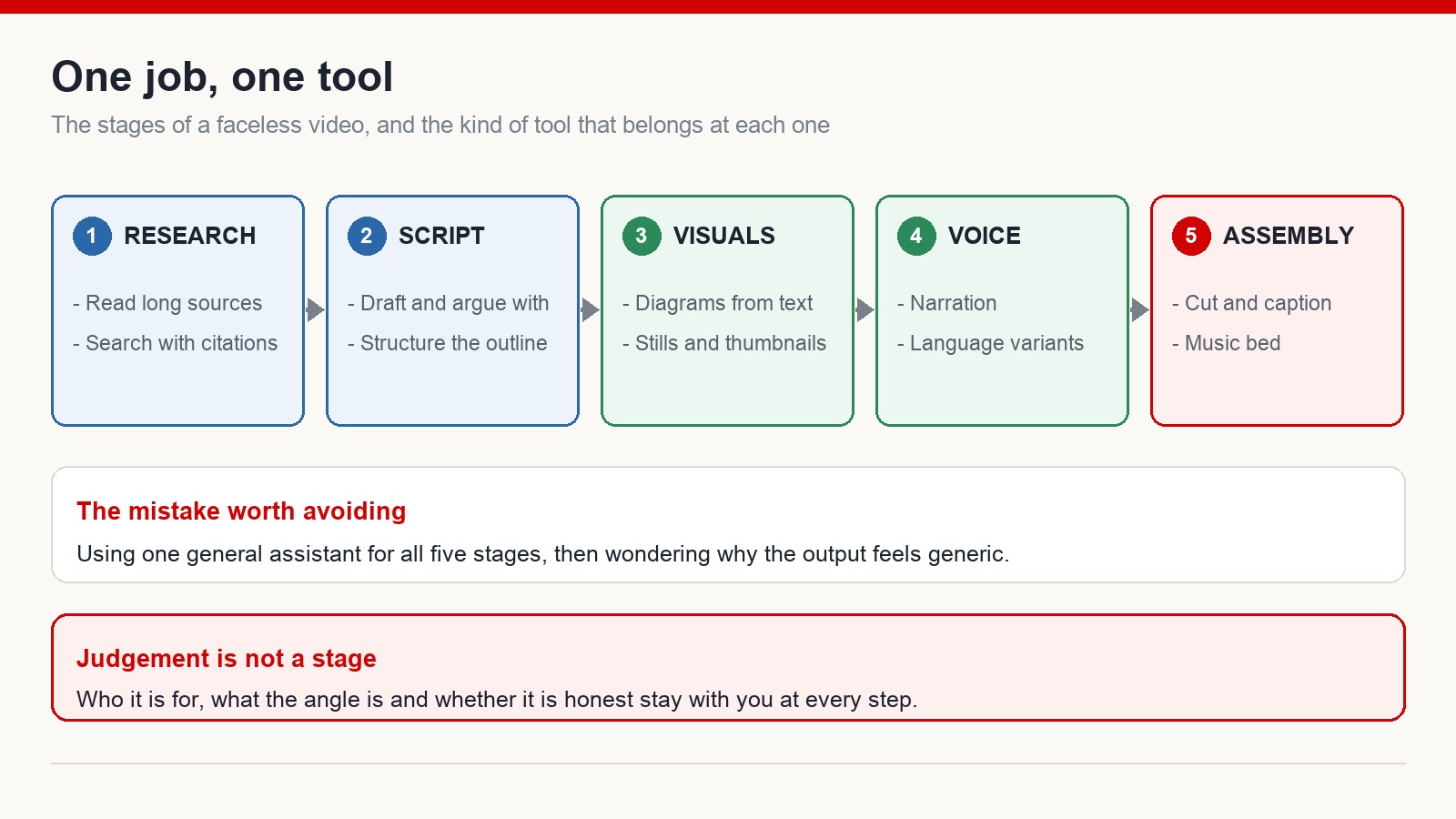
Research and reading
NotebookLM. You upload your own sources – PDFs, documents, long transcripts – and ask questions against them. The answers point back at your material rather than at the open internet, which makes it useful for genuinely long reading you would otherwise skim. It will also produce an audio walkthrough of the material if you prefer listening. This is the one I reach for when a topic needs actual background rather than a plausible-sounding summary.
Perplexity. Search that answers in prose and shows you where the answer came from. The citations are the point: you get a starting position plus the links to check it. For anything factual going into a script, treat the answer as a lead and open the sources.
Writing and structure
Claude. Strong on long documents and on prose that does not read like a template. I use it for outlines I can argue with, for tightening lines that run long, and for having a draft criticised before I commit to it. The trap is letting it write the whole thing – a script with no first-hand experience in it sounds exactly like what it is.
Gamma. Turns a topic or a block of text into a presentation with layout and images already handled. Not directly a video tool, but if you make explainer content, having a structured visual sequence generated in minutes rather than hours changes what is worth attempting.
Visuals
Napkin AI. Converts written text into diagrams, flowcharts and mind maps. If you have ever tried to explain a process in narration and watched the retention graph sag, this is a direct fix – one clear diagram usually does what ninety seconds of description could not.
Ideogram. Image generation that handles rendered text noticeably better than most. Useful for thumbnail concepts, posters and anything where words have to appear inside the image and be legible. Check what comes out very carefully anyway – generated lettering still produces convincing nonsense, and misspelled text in a thumbnail is worse than no text.
Voice, music and motion
ElevenLabs. Synthetic narration that is close enough to natural for a faceless video, across a wide range of languages. This is the tool that removed the accent barrier for people making content in a language they do not speak fluently. Voice cloning is a separate matter: cloning a voice you do not own permission to use is not a grey area.
Suno. Generates a complete track – melody, lyrics, vocals – from a description. Handy for background music without licensing a library. Read the terms carefully before putting it in a monetized video, because what you are allowed to do commercially usually depends on which plan generated the track.
Higgsfield AI. Video generation with a strong emphasis on camera movement and cinematic framing. Useful for short illustrative shots you cannot film. Free access is limited, and generated footage still needs an honest eye – if a shot looks wrong, viewers notice before you do.
Assembly
CapCut. An editor with automatic captions, background removal, text-to-speech and rough-cut assistance built in. For short-form especially, the auto-caption feature alone saves a meaningful amount of time every week. Feature availability moves between free and paid tiers regularly.
How to actually adopt these
The mistake is trying all ten in a weekend. You end up with ten half-learned tools and no working process.
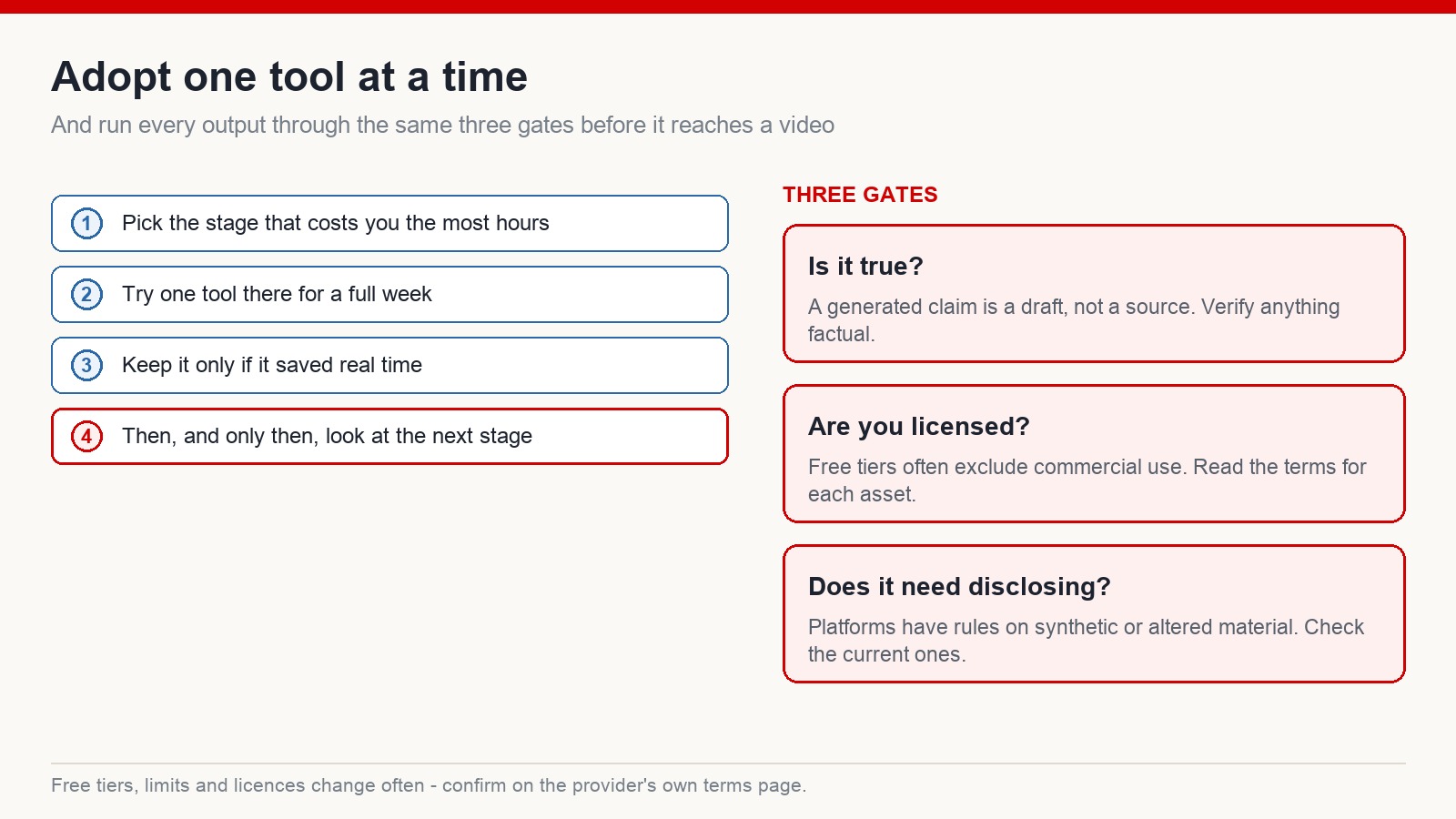
Pick the stage of your workflow that costs you the most hours. Try one tool there for a full week – long enough to get past the demo phase. Keep it only if it actually saved time rather than just being interesting. Then look at the next stage.
And put every output through the same three gates before it reaches a video.
- Is it true? A generated claim is a draft, not a source. Anything factual gets verified against something that is not a model.
- Are you licensed? Free tiers frequently exclude commercial use, and a monetized video counts as commercial. Read the terms for each asset you use, not once for the tool in general.
- Does it need disclosing? Platforms have rules about synthetic and altered material, and those rules have been rewritten more than once. Check the current version rather than the one you learned last year.
Free tiers, limits and licences all change constantly, so treat every “free” label – including in this article – as something to confirm on the provider’s own terms page before you rely on it.
The point is fit, not power
Stop looking for the best AI. Look for the one that fits the job in front of you.
A creator needs a different set from a student. A marketer needs a different set from a developer. Nobody uses one hammer for everything, and the reason the general assistant feels underwhelming for some tasks is that it was never the right tool for them.
What none of these do is decide anything. They do not know who your video is for, what angle is worth taking, or which claim you should refuse to make for a click. That part stays with you at every stage – and increasingly, it is the only part that distinguishes your channel from everyone else who has the same subscriptions.
Frequently asked questions
Which of these matter most for a video channel?
Research and script tools for the front end, a voice tool for narration, and an editor with captioning for the back end. Add visual generation once the rest of the process is stable.
Do I have to pay?
Most have a free tier or a trial with limits, which is usually enough to find out whether the tool fits your process. Check whether that free tier permits commercial use before it goes into a monetized video.
Is one general assistant enough?
It can cover a lot, but specialised tools tend to win on their own ground – grounded research, voice, diagrams, editing. Combining a few beats stretching one across everything.
Will using these hurt my channel?
What matters is whether the finished video is original, accurate and worth watching, and whether you have followed the platform’s current disclosure rules. Tools are not the issue – unchecked output is.
If you want to see how a tool set like this fits into building channels for English-speaking audiences, that is what I work on at mmoyoutube.com.

One Comment